Uncle Grump: A Bold, Hand-Drawn Font for Fun Projects
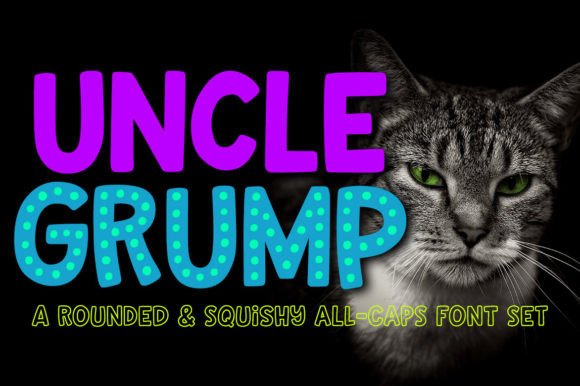
You know that feeling when you're working on a project and you need a font that doesn't take itself too seriously, but still looks polished and intentional? That's the sweet spot Uncle Grump was designed for. It's a heavy, bold typeface with rounded corners and a distinct hand-drawn character that brings immediate warmth and personality to any layout. Unlike sterile, geometric sans serifs or overly formal serif fonts, Uncle Grump steps in with a confident, friendly presence that feels both approachable and carefully crafted.
What makes it particularly useful is its dual nature. Yes, it's fantastic for kid-focused designs—think birthday invitations, children's book covers, playful apparel, or educational materials. The rounded, chunky letterforms are inherently fun and easy for young eyes to process. But don't let that fool you into thinking it's limited. The same qualities that make it kid-friendly also give it a retro, nostalgic, or artisanal vibe that works brilliantly for adult-oriented projects. Imagine it on craft brewery labels, indie band merchandise, quirky marketing campaigns, or social media graphics for a lifestyle brand with a sense of humor. It bridges that gap between playful and sophisticated with surprising ease.
More Than a Single Font: A Layered Design System
One of the most practical aspects of Uncle Grump isn't just the base alphabet—it's the included style variations that transform it from a simple display font into a versatile design toolkit. The download includes four distinct but related font files, each serving a specific purpose in creating layered, textured typography.
- Uncle Grump (Solid Base): This is your workhorse. The clean, solid version is perfect for headlines, logos, and any application where you need bold, readable text with character.
- Uncle Grump Dotty: This version takes the solid base and cuts out transparent dots from the letterforms. Use it when you want a subtle, textured pattern within the letters themselves, adding depth without extra layers.
- Uncle Grump Overlay Dots: A separate font file that contains just the dots. You can layer this directly over the base Uncle Grump font, aligning them perfectly, to add a dotted outline or fill effect. Experiment with different colors for a truly custom look.
- Uncle Grump Overlay Outline: Similar to the dots, this file provides a clean outline that sits on top of the solid base. This allows you to create outlined or two-tone effects easily by changing the color of the top layer.
This system means you're not just buying one font; you're getting a premium font package that allows for creative experimentation. For a logo design, you might use the solid base for maximum impact. For a poster or packaging design, layering the outline over the base in contrasting colors can create a vibrant, eye-catching effect that feels custom-made. It's a smart way to build visual hierarchy and interest directly within your typography.
Practical Applications and Design Considerations
So, where does Uncle Grump truly shine? Its heavy weight and playful style make it a natural for projects where grabbing attention and conveying a specific mood are priorities. Think about social media graphics where you need to stop the scroll, or web design elements like hero banners or call-to-action buttons that need to feel energetic and inviting. It's an excellent choice for editorial design in magazines or blogs targeting a creative, youthful, or family-oriented audience—perfect for pull quotes, section headers, or article titles.
When it comes to brand identity, Uncle Grump can be a strategic asset. It immediately signals a brand that is friendly, approachable, creative, and perhaps a little irreverent. This makes it suitable for businesses in childcare, education, creative services, food and beverage (especially artisanal or fun brands), entertainment, and lifestyle sectors. However, like any creative font, context is everything. It would likely feel out of place on a corporate law firm's website or a luxury watch brand's brochure. Always evaluate the font's personality against the core message and audience expectations of your project.
A crucial part of using any bold, stylistic typeface effectively is font pairing. Uncle Grump demands attention, so it works best paired with simpler, more neutral companions. A clean sans serif font for body text or a straightforward serif font can provide excellent contrast and ensure overall readability. Avoid pairing it with other highly decorative or script fonts, as that can lead to visual clutter. The goal is to let Uncle Grump be the star of the show in headlines and key phrases, supported by a reliable, legible partner for longer text blocks.
Working With the Font: Technical and Licensing Notes
From a practical standpoint, Uncle Grump is built for smooth performance in modern design software. The lines have been smoothed and the number of nodes reduced, resulting in a clean font that cuts well on vinyl plotters, prints crisply, and renders cleanly on screen. This attention to technical detail is especially important for crafters and small business owners who might be using it for physical products.
Each font file includes a comprehensive character set: the standard A-Z, a-z, 0-9, and punctuation, plus over 300 extended Latin characters. This broad language support is a significant advantage for international projects or multilingual branding. You'll also find a handful of stylistic alternates for letters like A, J, K, R, T, t, and Y. These alternates are easily accessible in applications that support OpenType features, allowing you to fine-tune the look of specific words to avoid repetition or improve letterform flow. Everything is fully PUA-encoded, which means you can access all characters, including alternates and extended glyphs, in any program that supports Unicode—this is essential for crafters using software like Cricut Design Space or Silhouette Studio.
As with any commercial font, it's vital to understand the licensing. Uncle Grump is typically licensed for a wide range of uses, including digital and print, personal and commercial projects. However, always review the specific license agreement included with your purchase. It will clarify details about the number of users or computers covered, restrictions on embedding in apps or software, and policies regarding creating derivative products like logos for clients. Being informed about the license ensures you're using this excellent design asset correctly and professionally, protecting both your work and the font creator's rights.